B2B: Institutions
How a college, university, or corporate uses Kwilo, from onboarding to a graded assignment.
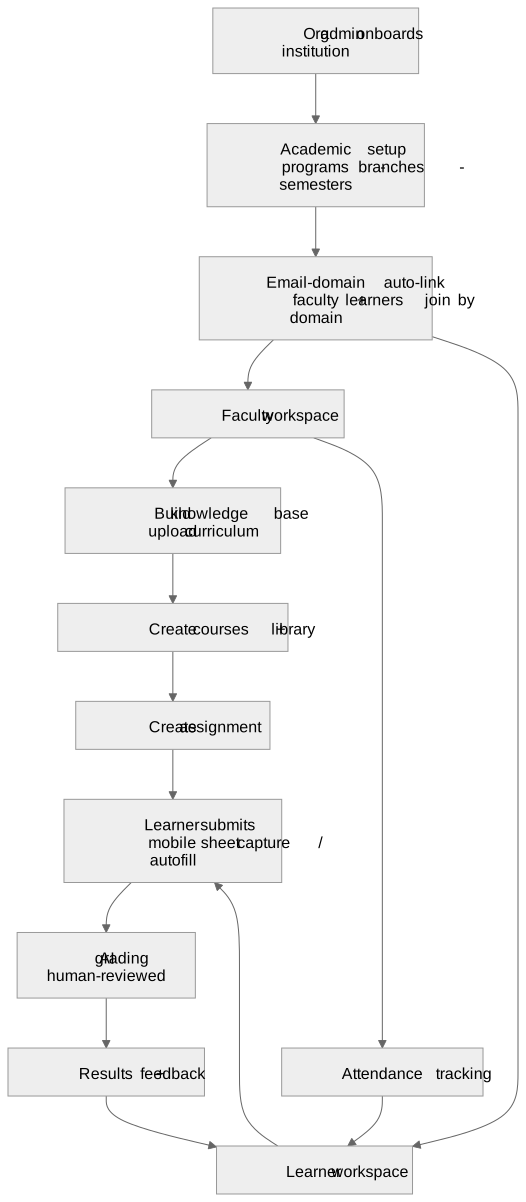
The loop in plain English
- An org admin onboards the institution and sets up the academic structure: programs, branches, semesters. This is the skeleton everything else hangs on. → Academic setup
- People join by email domain. Faculty and learners with an institutional email are auto-linked to the right org, so admins don't invite people one by one. → Domain matching
- Faculty build their material: a knowledge base from uploaded curriculum, then courses and a library. → Knowledge Base · Courses & Library
- Faculty generate and create assignments. Lesson plans and question banks are generated from chat, then edited in a two-pane document editor before publishing. → Document editor & generation · Assignments & AI Grading
- Learners submit: typed, or by capturing a physical answer sheet on mobile. → Mobile capture · Question-paper autofill
- AI grades, a human reviews, and feedback flows back to the learner. → Assignments & AI Grading
- Attendance is tracked alongside. → Attendance
Who does what
| Role | Lives in | Key surfaces |
|---|---|---|
| Org admin | Product app | Academic setup, member management |
| Faculty / trainer | Product app | Knowledge base, courses, document generation, assignments, grading, attendance, Teacher Home |
| Learner | Product app + mobile | Course content, submit work, see feedback |
Vocabulary
In the UI we say trainer and learner, not teacher and student (K-12 personas are the exception). Keep that voice in any B2B copy.
All B2B feature docs
- Academic setup (PU college / institution type)
- Faculty Knowledge Base
- Courses & Library
- Document editor & generation: lesson plans, question banks, block-level refine
- Assignments & AI Grading: create wizard, table view, AI grading
- Teacher Home (/teach)
- Attendance
- Physical Exam: Question Paper Autofill
- Mobile Answer Sheet Capture